Convert, edit, and create ringtones on-device with BR Converter
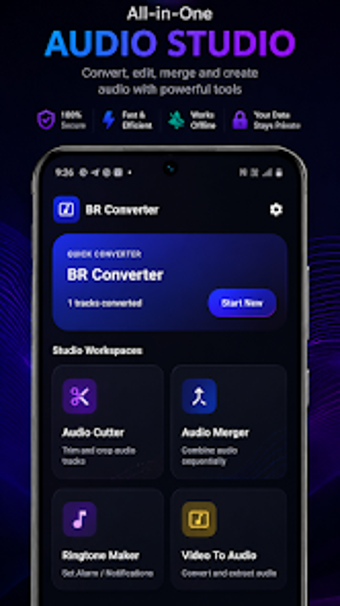
Experience a compact audio studio with BR Converter from Growing Bangla Tech Studio, designed to extract and edit audio directly on Android devices. The app converts video files into high-quality MP3 or AAC tracks, trims and merges audio, and produces ringtones and notification sounds without cloud transfers. A built-in media library and Material Design interface present conversion, cutting, merging, and ringtone tools in one place. Android users seeking a simple offline audio workflow get a privacy-focused, local-processing utility.
How reliable is the app's video-to-audio extraction?
Converter reads common video containers and produces MP3 or AAC audio from MP4, 3GP, and WEBM sources, according to its feature list. The tool pairs a fast extraction routine with a precision cutter so users can isolate segments immediately after conversion. In addition, an audio merger combines multiple outputs in order, which suits tasks such as assembling ringtone compilations or joining short clips into one track.
Does it slow down your device during conversion?
The developer positions the app as a lightweight utility with a Material Design interface optimized for smooth performance on Android devices. Because media work happens on-device, conversions use local CPU and storage rather than network resources, and the app is intended to operate without constant connectivity. System requirement starts at Android 5.0, which keeps compatibility with many handsets while excluding very legacy phones.
Is it safe to edit and set ringtones directly on the device?
The app adopts a privacy-first workflow by performing media processing locally, so personal files are not uploaded to external servers. Its Ringtone Maker and integrated media library allow users to trim segments and assign them as ringtones, alarms, or notifications from within the same interface. That local-only approach reduces exposure to network-based data handling and simplifies offline file management.
Do I need technical knowledge to use this tool?
The interface emphasizes straightforward controls and a central media library, which fits users who prefer simple editing without desktop software. Casual users can convert, cut, merge, and set tones from single screens, while the product does not target advanced multi-track workflows. Therefore, everyday handset tasks remain accessible, whereas professionals seeking detailed studio controls may find the app limited for complex productions.
Best for casual Android users; less suited to professional audio production
The developer's West Bengal base and leadership under Bimal Roy reflect a focus on lightweight mobile utilities aimed at everyday tasks. The clearest trade-off is a relatively small user base and limited advanced production capabilities, which reduce appeal for professional workflows. It complements the developer's portfolio of compact media and productivity tools, favoring simplicity over studio-grade complexity, and thus suits casual on-device audio work.